
Microsoft Planner is one of the many business solutions available with a Microsoft 365 subscription. It offers classic project management tools like different work views for personalization, integrations with outside apps and task-tracking options. With the subscription, you get access to several other Microsoft applications as well. The software itself is great, but it may not be the best fit for everyone.
In this list, we explore a number of competitors and alternatives with similar features. But if you want to learn a little more about Microsoft Planner and its capabilities, you should first see our review of Microsoft Planner.
Jira
Employees per Company Size
Micro (0-49), Small (50-249), Medium (250-999), Large (1,000-4,999), Enterprise (5,000+)
Any Company Size
Any Company Size
Features
Agile Development, Analytics / Reports, API, and more
Zoho Projects
Employees per Company Size
Micro (0-49), Small (50-249), Medium (250-999), Large (1,000-4,999), Enterprise (5,000+)
Any Company Size
Any Company Size
Features
Agile Development, Analytics / Reports, API, and more
Top Microsoft Planner competitors and alternatives: Comparison table
| Integrations | Multiple work views | Free trial | Free plan | Starting price | |
|---|---|---|---|---|---|
| Microsoft Planner | Yes | Yes | 1 month | No | $6 per user per mo. |
| Trello | Yes | Yes | 14 days | Yes | $5 per user per mo. |
| Asana | Yes | Yes | 30 days | Yes | $10.99 per user per mo. |
| ClickUp | Yes | Yes | Yes, though length unclear | Yes | $7 per user per mo. |
| Zoho Projects | Yes | Yes | 10 days | Yes | $4 per user per mo. |
| Evernote | Yes | Yes | 14 days | Yes | $10.83 per mo. |
| Basecamp | Yes | Yes | 30 days | No | $15 per user per mo. |
| Wrike | Yes | Yes | 2 weeks | Yes | $9.80 per user per mo. |
| monday.com | Yes | Yes | 14 days | Yes | $9 per user per mo. |
Trello: Best for simple project needs
Teams that don’t have super complex projects and prefer something easy to get started with can appreciate Trello. It’s beginner-friendly, and while it may not be overflowing with features, it thrives in minimalist design.
Pricing
- Standard: $5 per user per month billed annually, or $6 per user per month billed monthly.
- Premium: $10 per user per month billed annually, or $12.50 per user per month billed monthly.
- Enterprise: $17.50 per user per month billed annually. It has no month-to-month option.
Features
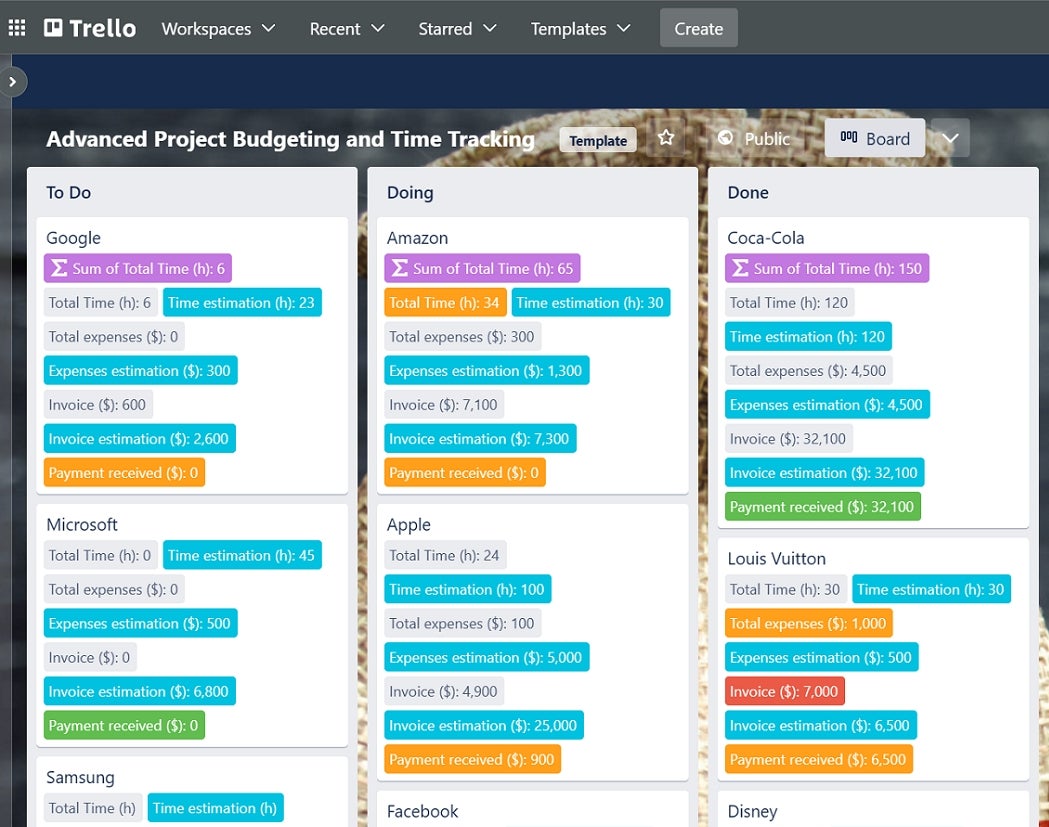
- Multiple work views including Kanban, table, calendar, map, timeline and dashboard (Figure A).
- Custom fields for project-specific needs.
- Task management for assigning each team member different project parts.
- Ability to integrate with over 200 applications.
- Mobile versions for iOS and Android.
Pros
- All plans have unlimited storage for their workspace (but there are individual file limits).
- Intuitive and easy to learn.
- The free plan comes with two-factor authentication.
- Affordable for big teams and freelancers.
- Great for Agile Scrum workflows with a sprint system.
Cons
- Different work views are limited between plans, i.e., Free and Standard only have Kanban.
- The premium tier can only deactivate members.
- Enterprise plan has most of the admin controls, like governance and user provisioning.
- Not the best platform for detailed projects with extensive data to organize.
Top integrations
Trello’s top integrations include:
- Slack.
- Jira.
- Google Drive.
- Confluence.
- Dropbox.
Why we picked Trello
Trello caught our eye through its intuitive, board-based approach to project management, which makes it an intuitive and accessible asset for teams of all sizes. It’s flexible and has a wide range of integrations that make it easy to adapt to all sorts of visual project needs.
For more information, read our full Trello review.
Clickup: Best for customization of big projects

ClickUp is a project management tool for all-purpose needs. You will have access to automation, custom work views, collaboration and high-level security. If you’re looking for an array of tools and features to personalize your workspace and stay on top of projects, then you should consider Clickup.
Pricing
- Unlimited: $7 per user per month billed annually, or $10 per user per month billed monthly.
- Business: $12 per user per month billed annually, or $19 per user per month billed monthly.
- Enterprise: Custom pricing.
Features
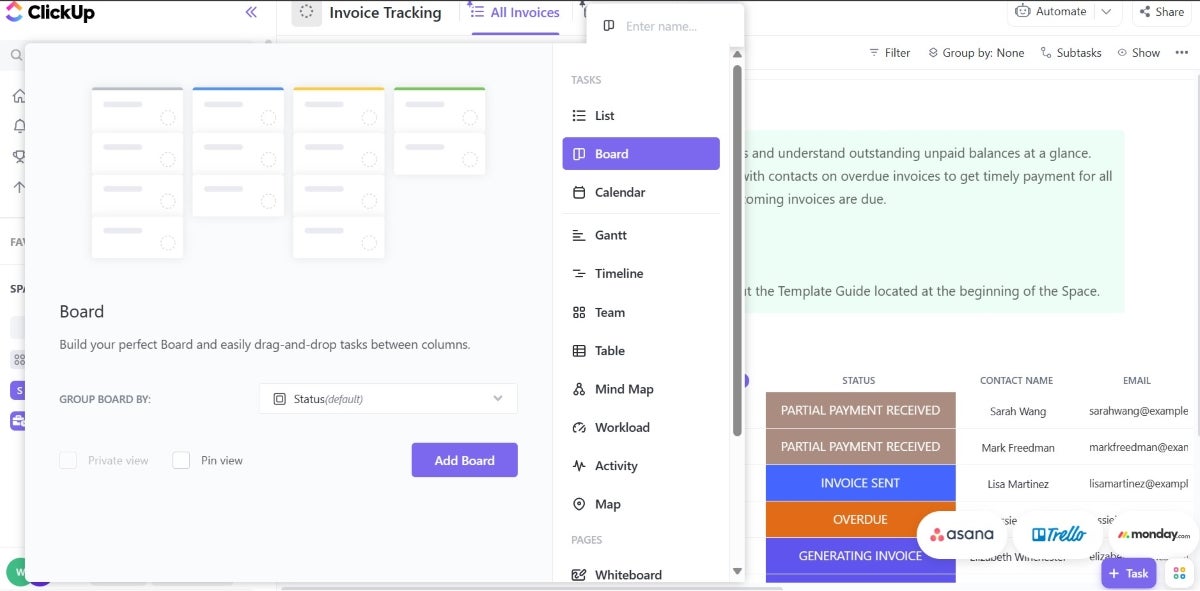
- Multiple work views to personalize your workspace including Kanban, timeline, table, map and more (Figure B).
- Unlimited file storage for paid plans.
- Built-in option for video recording.
- Time tracking and reporting for staying on top of tasks.
- Natural language processing (NLP) can be used for scheduling in all plans.
- Workspace templates available to make setup easier for your team.
- ClickUp AI add-on for writing and editing content.
Pros
- Task automation for streamlining workflow.
- All plans have access to over 50 native integrations.
- All plans have at least two-factor authentication.
- 24/7 support (via Help Center) is available for all subscriptions, including the Free plan.
- Feature-rich enough to handle Agile Scrum projects with higher volumes of data or information.
Cons
- Business plan required to remove branding from emails.
- Only Business Plus and Enterprise can create custom roles for team members.
- Scrum teams may not like that only the Business plan has sprint reporting.
- Only Enterprise can have HIPAA compliance.
- Guests on paid plans are limited and charged unless they are view-only.
- The software can get pricey the more users and guests you add.
Top integrations
ClickUp’s top integrations include:
- Slack.
- HubSpot.
- Make.
- Gmail.
- Zoom.
Why we picked ClickUp
ClickUp is a versatile platform with customizable features for task management, document collaboration and goal tracking, meaning that it’s a great fit for projects that need flexibility and scalability. It’s easy to use and has a clean user interface, too.
For more information, read our full ClickUp review.


