
At this point, further complaining about Sonos is more of an exercise in bouncing the rubble than anything else. The damage from a spring overhaul is done, even though the company does continue to slowly push out improvements and fixes to its app.
But incremental improvements so far haven’t done anything about the fact that more often than not the official Sonos app just doesn’t … work. So it’s time for some third-party solutions. And a leading contender on iOS is SonoPhone.
This is a $3 app. Not $3 a month — a one-time purchase. That in and of itself is a bit of fresh air in 2024, when we’re being subscriptioned to death. Another plus is that this single app supports both current S2 devices, and the legacy S1 hardware, too. That’s a good thing.

SonoPhone purports to require fewer taps to do basic functions. I haven’t counted, but that seems to be the case. Or at least it’s close enough that I haven’t really noticed.
The user interface will take just a little getting used to, if only because it’s different than the official Sonos app. (And not just in that it, ya know, works.) Your speakers are accessible from the top — tap to see ’em. And you can group them into “zones” in a way that I think I prefer over the way Sonos does in its app. Just drag one speaker onto another to create a zone. And drag it off to break up the zone. (My “pool” speaker actually is a stereo pair of old Play:1s, and it properly appears as a single speaker. That’s good.)
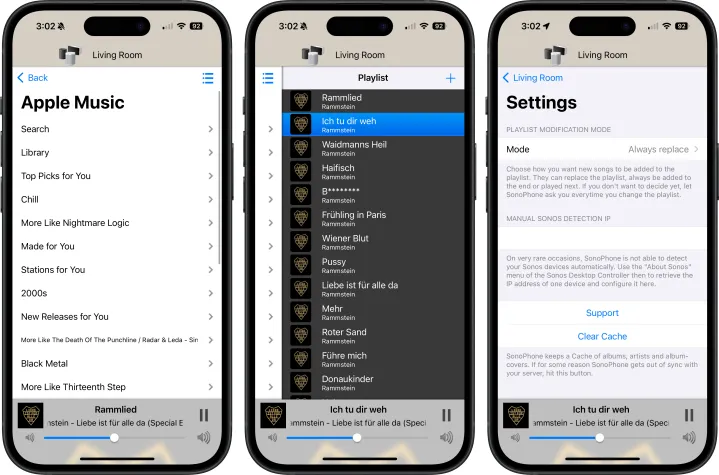
All the various music options are here, too. Playlists, favorites, Sonos radio — even music stored on my NAS. It’s all there. And if you have multiple users of a single service in your home, it’s easy enough to tap through and select the right one. (If you’ve ever had a kid spoil your recommendations, you’ll know why that’s a big deal.)
SonoPhone isn’t a particularly sophisticated app, especially in the UI department. (It looks like something you might have found on the Android side of the world a decade or so ago.) And access to the deeper Sonos settings are extremely limited, including adding new speakers. You’ll need to keep the official Sonos app around, for sure.
But at least you won’t need to suffer through it on a daily basis.


