
Google has announced a laundry list of feature updates for Workspace users, with a focus on using its Gemini AI across products like Gmail, Docs, and Calendar.
For folks who rely on the side panel in Gmail, there is some good news. Gemini can now directly access the Calendar information from within the inbox side panel, and perform relevant actions, as well.
Let’s say you are drafting an email and need to reference your calendar entries, Gemini will now do that for you. You can ask it to check the schedule for a particular date, ask Gemini to create an entry (one-off or recurring), and have it create a new event without leaving the Gmail interface.
The new capability is helpful, but not a holistic one. For example, Gemini in Gmail can’t perform tasks such as adding or removing a person from an event, showing attachments, synchronizing schedules to find the best spot for a meeting, specifying work location, or handling meeting rooms.
Gemini in Gmail will be able to access Calendar details for paid Gemini users or subscribers of the Google One AI Premium plan. Moreover, it is limited to English language support at the moment.
Google’s AI toolkit is also bringing image creation superpowers to Docs. Back in September, Google introduced the ability to upload full-bleed cover images in Docs. Users are able to pick from a curated gallery they can access from the new “Cover Image” option in Docs, or upload from a local gallery.
Now, users can use Gemini to directly create media that they can use as a cover image, or even as inline photos. The text-to-image pipeline is handled by Google’s Imagen 3 image generation model. Notably, users can create photorealistic images, as well.
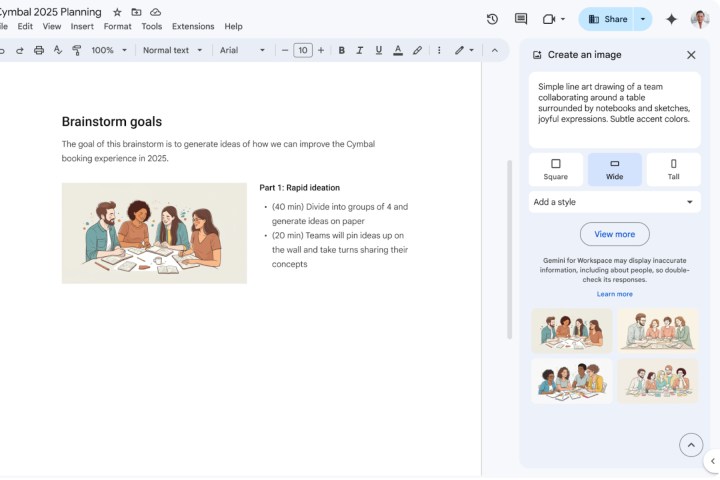
More importantly, users will also be able to specify not only the style of picture, but also dictate the aspect ratio. To create images, just follow this path: Insert > Cover image > Help me create an image.
In order to add an inline picture, this is the pipeline: Insert > Image > Help me create an image > (type in an image description.)
This feature has already started to roll out for business and education Gemini users, and folks paying for the Google One AI Premium subscription plan. On a related note, Google has also finally launched the standalone Gemini app for iPhone users.
Earlier this week, Google also added support for uploading Docs and Sheets directly from Google Drive, while creating a custom Gem assistant. The updated list of document and text files now includes “TXT, DOC, DOCX, PDF, RTF, DOT, DOTX, HWP, HWPX, and Google Docs,” says Google.


