Keeping your emails organized is essential to finding the ones you need when you need them. One easy way to do this is by creating folders and moving your messages to them.
If you use Gmail, you’ll see default folders, those already created for you, in the menu on the left side. When you set up your own, they’ll fall in line in that same spot, giving you a quick and easy way to organize your inbox. Here’s how to create folders in Gmail and move emails to them.
.
Create a folder in Gmail
Before we begin, it’s important to note that Gmail doesn’t refer to folders as “folders.” They’re called “labels,” but function the same way as folders.
To make a label on desktop, just click the plus sign next to the word “Labels” in the menu on the left. Then enter a name for the label and, optionally, another label to nest it under.
Oddly enough, you cannot make a label on Android phones. If you own an iOS device, however, you can find a “Create New” button in the menu that pops up after tapping the three horizontal lines icon in the top left.
Move an email to a folder
You have a few different ways to move emails to folders in Gmail. Probably the simplest way is to use the Move to option in the toolbar.
Step 1: Select the email you want to move in your inbox by ticking its corresponding checkbox.
Step 2: Pick the Move to option in the toolbar at the top. The Move to icon looks like a file with an arrow in the middle.
Step 3: From the menu that appears, choose the folder where you want to place the email.
When you do this, it removes the email from your Inbox and places it in the chosen folder. This is a great way to keep your inbox neat and tidy.
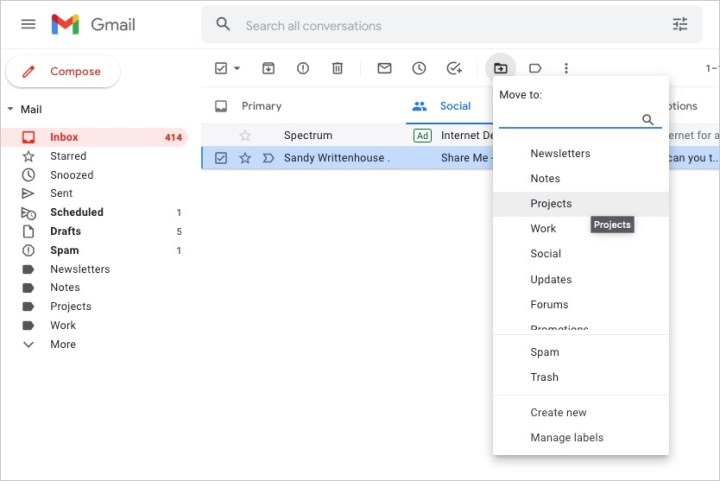
Image used with permission by copyright holder
Step 4: You can also move an email to the folder by doing one of the following:
- Drag the email from your inbox to the folder in the left-hand menu.
- Right-click the email, hover your cursor over Move to, and choose the folder.
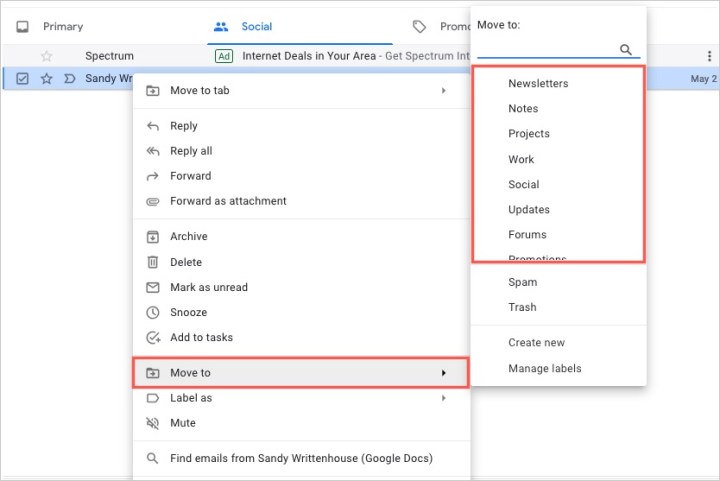
Image used with permission by copyright holder
By creating folders (or labels) in Gmail, you can keep your messages organized for work, school, your personal life, or whatever you find most helpful.
For more, take a look at Gmail keyboard shortcuts you should know or how to find archived emails in Gmail.
Editors’ Recommendations


