
There are myriad reasons why we consider Apple TV 4K to be the best streaming device you can buy. And one of those reasons is that the excellent integration with iPhones and iPads. With just a couple taps, you can use your mobile device as a remote control, for those times in which you simply can’t be bothered to look for the little Siri Remote.
But that doesn’t mean the integration is perfect. The Remote app in iOS by default has a virtual trackpad. Drag your fingers over it, and it’s like you’re using the trackpad on the physical remote. But the physical remote also has proper directional buttons — up, down, left, right. Those are missing on the Remote app, but it’s easy to add a proper D-pad to it, should you need one.
Why bother? Here’s an example: The Apple Music app on Apple TV uses the trackpad to scrub through a track — as in, fast-forwarding or rewinding. But if you want to skip a track or go back a track? That requires a directional button. So you’ll need to add it to the app. We’re going to show you how to do that.
Phil Nickinson / Tech Reader
How to get directional buttons on your remote control app
Adding a D-pad to the Remote app should take about 30 seconds. But it’s one of those settings that you probably would never think to look for unless you already knew it was there.
Step 1: Grab your iPhone or iPad. This will work with either.
Step 2: Open the Settings app. Scroll down to Accessibility and open that up.
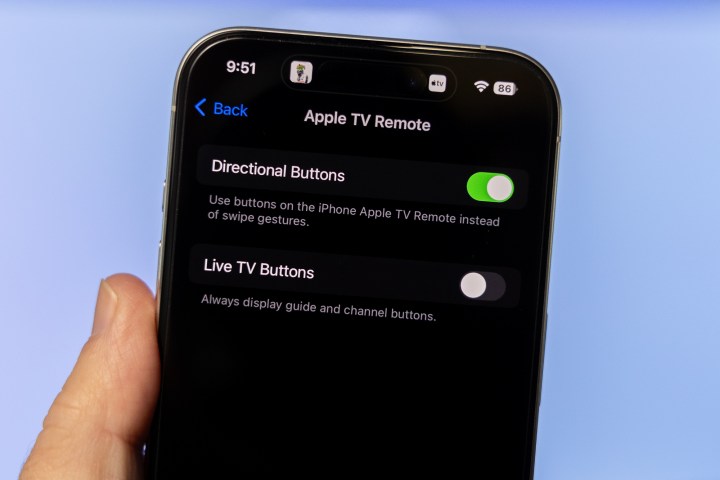
Step 3: Scroll down to Apple TV Remote in the Physical and Motor section and select it.
Phil Nickinson / Tech Reader
Step 4: Toggle the setting for Directional Buttons.
And that’s it. The next time you open the Remote app on your iPhone or iPad, it’ll have proper directional buttons — up and down, left and right — instead of a phone-based version of the Siri Remote’s trackpad. (Which itself is a weird little hybrid of a trackpad and a D-pad.)
And the nice thing is you can always reverse these instructions to turn it off, if you decide you want to go back to all trackpad all the time.
Editors’ Recommendations


