Microsoft Teams is a terrific platform for workplace collaboration, but there may come a time when you need to leave a particular team. Whether it’s because a project has been completed, or specific employees are switching roles, or simply joining another team or project, removing yourself from an existing Teams collaboration couldn’t be easier. Plus, we’ve put together this step-by-step explainer for carrying out this task, which covers both desktop and mobile versions of Microsoft Teams.
How to leave a Microsoft Team
Before you begin, it’s a good idea to make sure you are supposed to leave a team or have permission from a team owner to do so. Leaving and joining teams without letting others know can cause confusion.
Step 1: Log into Microsoft Teams and select the Teams icon on the left-side menu. Navigate to the team that you want to leave.
Step 2: To the right side of the team name, you’ll see a three-dot ellipses icon. Select it to open up the Teams menu. Here, you’ll see a variety of options, including hiding the team (if you don’t want to leave it quite yet) and managing the team if you are the team owner. Don’t confuse this with the dropdown menus for team channels, which are subheadings within the team itself and do not include the option to leave.
Tech Reader
Step 3: Select Leave the Team. Confirm that you want to leave. The team will typically disappear from your Teams menu with no further steps.

Tech Reader
Step 4: The big exception to this process is leaving an organization entirely, or a special org-wide team that your admin may have created. You cannot leave these on your own. You will have to contact your admin and ask them to remove you if it has not already been done.
Tech Reader
Leaving a Microsoft team on mobile
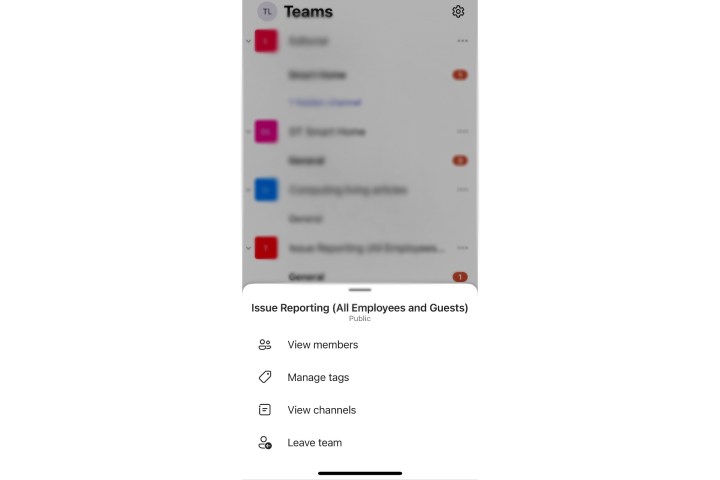
Leaving a Microsoft team works a bit differently on mobile devices, so keep this in mind. If you are on an iOS device like an iPhone, the menu will be very similar, except the Teams list will be on the bottom instead of the side. Previous versions of iOS Teams didn’t allow you to leave a team, but this has since been updated, so the process should be the same.
It’s also similar for Teams on an Android device, where you’ll look for the More options dots beside a team name to choose to Leave the team.
Important tips on leaving a Microsoft Team
-
When you leave a team for good, you will no longer receive any notifications associated with that team. That includes any updates that the team may sound out or tag in channels. However, your chat options in Teams should still work, so as long as a person is part of your Teams organization, you should still be able to contact them one-on-one. However, team-wide video meetings probably won’t be available to you anymore.
-
Leaving a team does not erase any messages or content that you have sent in that team. All your old messages will still be available for team members to see.
-
Even when you leave a team, you are still part of the organization that created the team. If you want to leave the organization as well, you can visit your My Groups section in the Apps tab and select your profile to choose to leave organization. This isn’t available in every Teams setup, so if you don’t see this option, contact your admin to learn more.
-
In some cases, you won’t be able to leave a non org-wide team. For example, students using the education version of Microsoft Teams won’t be able to leave a team on their own. If you are the last person on a team and have automatically been appointed as a team owner or similar responsibility, you may not be able to leave a team until you fully delete it.
-
If you are switching to a new team as part of restructuring, make sure that you have the necessary information to join or a direct invite before you quit your old team. Not all teams are public, and many require invites or codes to join.
What if I accidentally left a team?
In the event that you’ve removed yourself from a team unintentionally, you’re certainly not up the creek. The only thing you’ll need to do is reach out to the owner of said team to ask them to re-add you to the group.
Why can’t I leave a team on Microsoft Teams?
As mentioned above, you’ll be able to remove yourself from any team on your own, but if you’re part of a larger org or org-wide team, only the admin of said group will be able to permanently remove you from the larger organization.

Microsoft
How do I manage Teams settings as an admin?
If you’re the owner/admin of a Microsoft Teams group, you’ll be able to access your team settings by heading to the Teams Admin Center. All you have to do is log into Teams using your admin info, and click Teams Admin.
This dashboard allows you to customize individual account settings and permissions, security features, and more.
Does your new team care about your Microsoft Teams status or use it as a sign of productivity? You may also be interested in our guide on how make sure your status remain active in Microsoft Teams.
Editors’ Recommendations


